Changelog

Everything we've shipped

v1.18.0

Session Handoffs and a New Agent
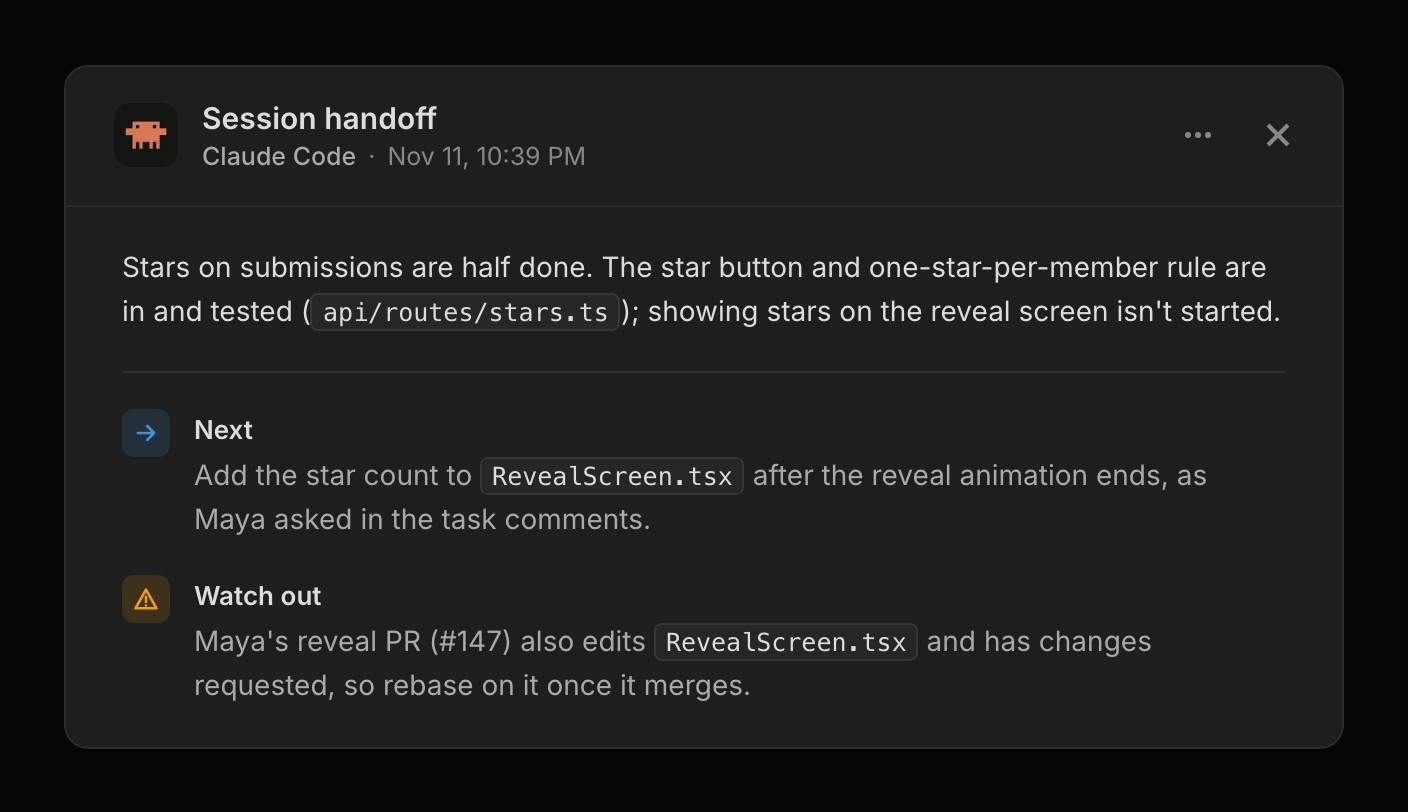
A Claude Code session handoff for RollCall with a status line, then Next and Watch out parts

Your connected agent can leave a session handoff when you finish for the day, and it writes one itself when it stops with work unfinished. A handoff says what got done, what to do next and what to watch out for. The newest one pins to the top of Recent Activity on the dashboard for 7 days, and choosing it opens the whole thing.

The next session gets the handoff back with its first read of the project, so there's nothing to paste in. Frostbyte keeps the last three, so two agents working side by side don't overwrite each other, and the older ones open from Recent Activity.

For things that aren't tasks, such as how the app is put together, agents keep up to five notes under Context on the Product page. Any connected agent can look them up when it needs that background, and add to them as it learns more. Notes and handoffs are read-only in Frostbyte, any member can delete one, and they work on every plan.

A redesigned Frostbyte Agent
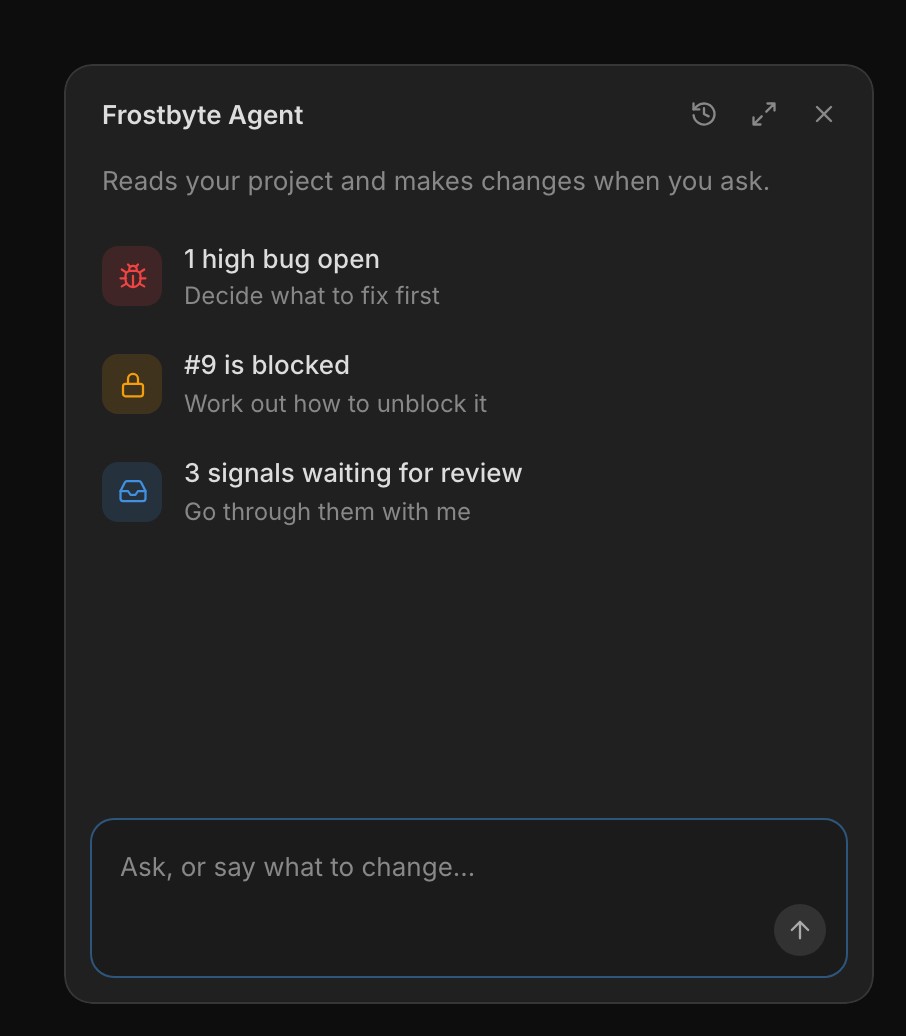
The Frostbyte Agent panel suggesting a high bug, a blocked task and three signals waiting for review

The Agent has a new look. Open it from the Agent button at the bottom right of any project page, or press ⌘J (Ctrl J on Windows and Linux). The panel grows out of the button and folds back into it, and closing it keeps your conversation. History and New chat sit in its header.

Before you type, it lists up to three things in the project that need a decision, most pressing first, such as an urgent bug, a blocked task or signals waiting for review. Select one and the Agent starts on it. The suggestions themselves don't use AI credits.

Area cards show the open work in each part of the product, what's blocked and who's on it, with the most recently active areas first. Choose Write description from a card's ⋯ menu and the Agent writes the area's description for you.

Moving from another tool is easier
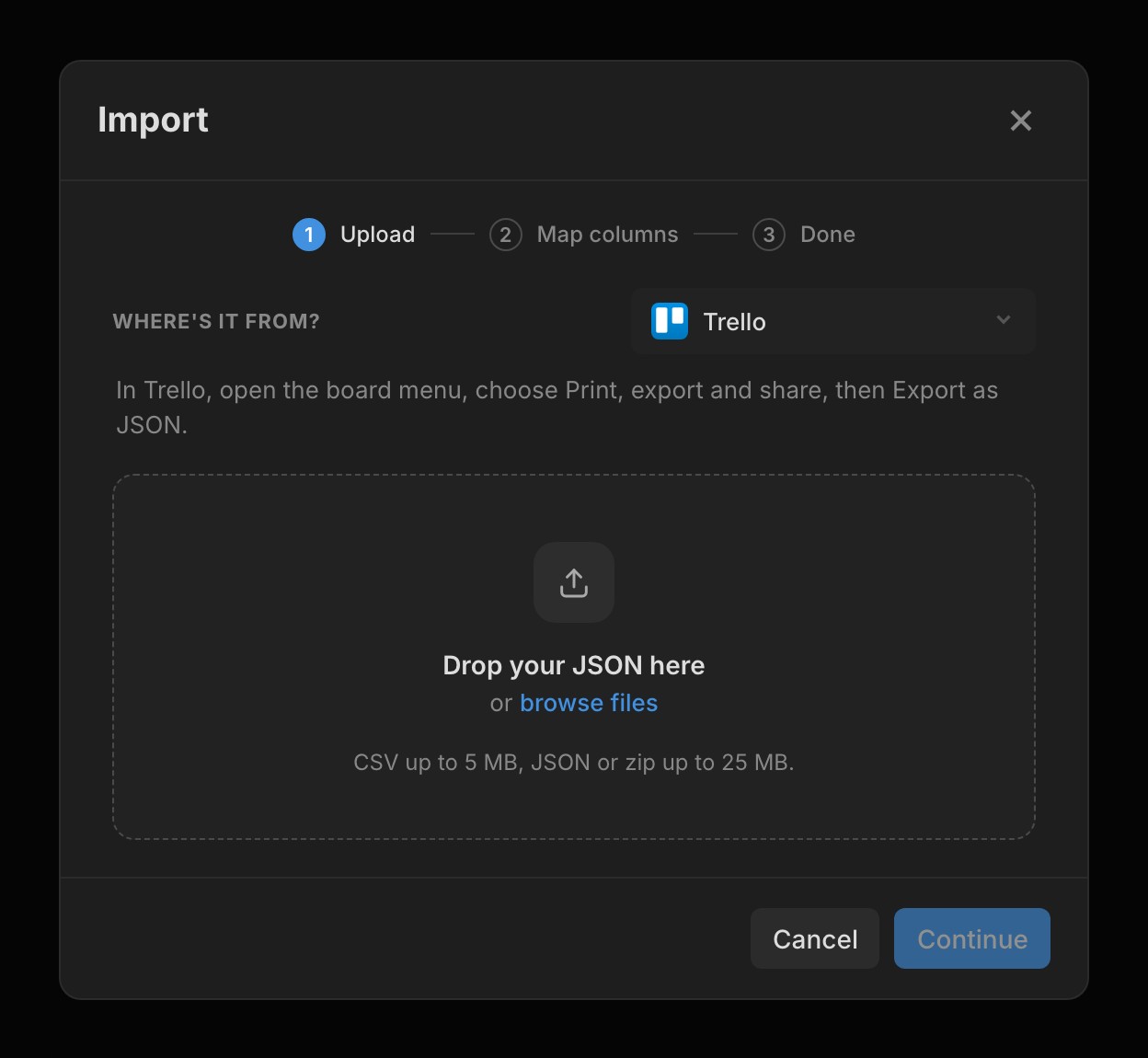
The Import dialog with Trello picked under Where's it from, showing how to export a board as JSON

Import reads exports from Linear, Jira, Asana, Notion, Trello, ClickUp and GitHub for tasks, and from Canny and Featurebase for feedback. Open the project's ⋯ menu, choose Import, and pick where the file's from to see how to export it from that tool. Frostbyte matches each column to a field and each status to what it meant there, and you can change any of them before you import.

Import as Tasks, Signals, or Signals and tasks. Releases and areas come across where the tool has them, such as Linear's cycles and projects. Imported signals stay off your Feedback Portal unless you tick Show them on your feedback portal, and only the project owner sees requester names and emails. Only the owner can import, and every task it creates counts towards your plan's limits.

Pull requests move your tasks
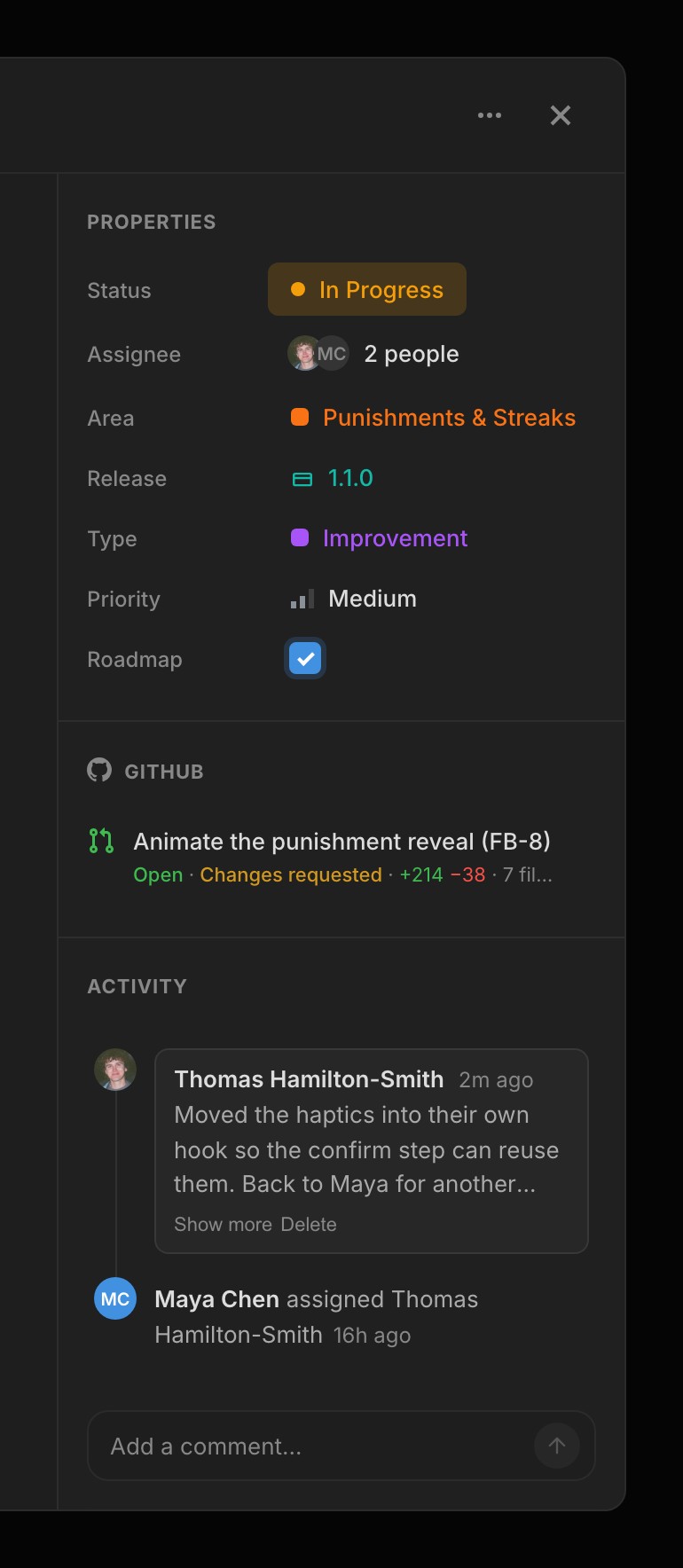
A task's sidebar with an open pull request marked Changes requested, its lines changed, and a comment in Activity

Write FB- and the task number in a commit or pull request, such as Fixes FB-13, or name the branch after the task, and it links to that task. Turn on Move tasks with pull requests under GitHub in Project settings, and opening a pull request moves its task to In Progress. Merging one that closes the task into your default branch moves it to Done.

The task's GitHub section shows each pull request's lines added and removed, how many files it touches and, while it's open, whether it's approved. When a reviewer asks for changes, the card turns orange with Changes requested. Reviews don't move the task.

New features 12
  • Session handoffs pinned to Recent Activity, with the last three kept Agent
  • Up to five agent notes under Context on the Product page Agent
  • The session_end, list_notes, get_note and write_note tools MCP
  • Import tasks from Linear, Jira, Asana, Notion, Trello, ClickUp and GitHub Projects
  • Import feedback from Canny and Featurebase as signals Signals
  • FB- references link commits, branches and pull requests to tasks GitHub
  • Move tasks with pull requests, to In Progress and then Done GitHub
  • A redesigned Agent panel with suggested actions Agent
  • Write description in an area card's ⋯ menu Areas
  • The Agent links GitHub pull requests, issues and commits to tasks GitHub
  • Grok connects to Frostbyte as a custom connector Agent
  • A What's new card in the sidebar Navigation
Improvements 13
  • Linked pull requests show lines changed, files touched and review state GitHub
  • Changes requested shows on the task card GitHub
  • Area cards show open work, blockers and who's on it, busiest first Areas
  • ⌘J opens and closes the Agent Agent
  • A compose button in the sidebar, and C opens New task Navigation
  • A task's activity reads as a timeline Tasks
  • Signal attachments show like task attachments Signals
  • Connections has separate cards for agents and GitHub Settings
  • Search engines index each Feedback Portal once, from its sitemap Feedback Portal
  • Each changelog entry has its own page Navigation
  • Dialogs ease open and fade out Navigation
  • Opening sign in or sign up while signed in takes you to your projects Auth
  • A sign-in error puts your cursor in the field to fix Auth
Bug fixes 5
  • The homepage opens while you're signed in Navigation
  • The Claude Desktop plugin setup steps work as written Agent
  • Project settings loads with a skeleton that matches the page Settings
  • #13 in a commit only reaches the task synced to issue 13 GitHub
  • Google indexes Feedback Portals on their own domain Feedback Portal
v1.17.0

Project Health, What's Next and Changelogs

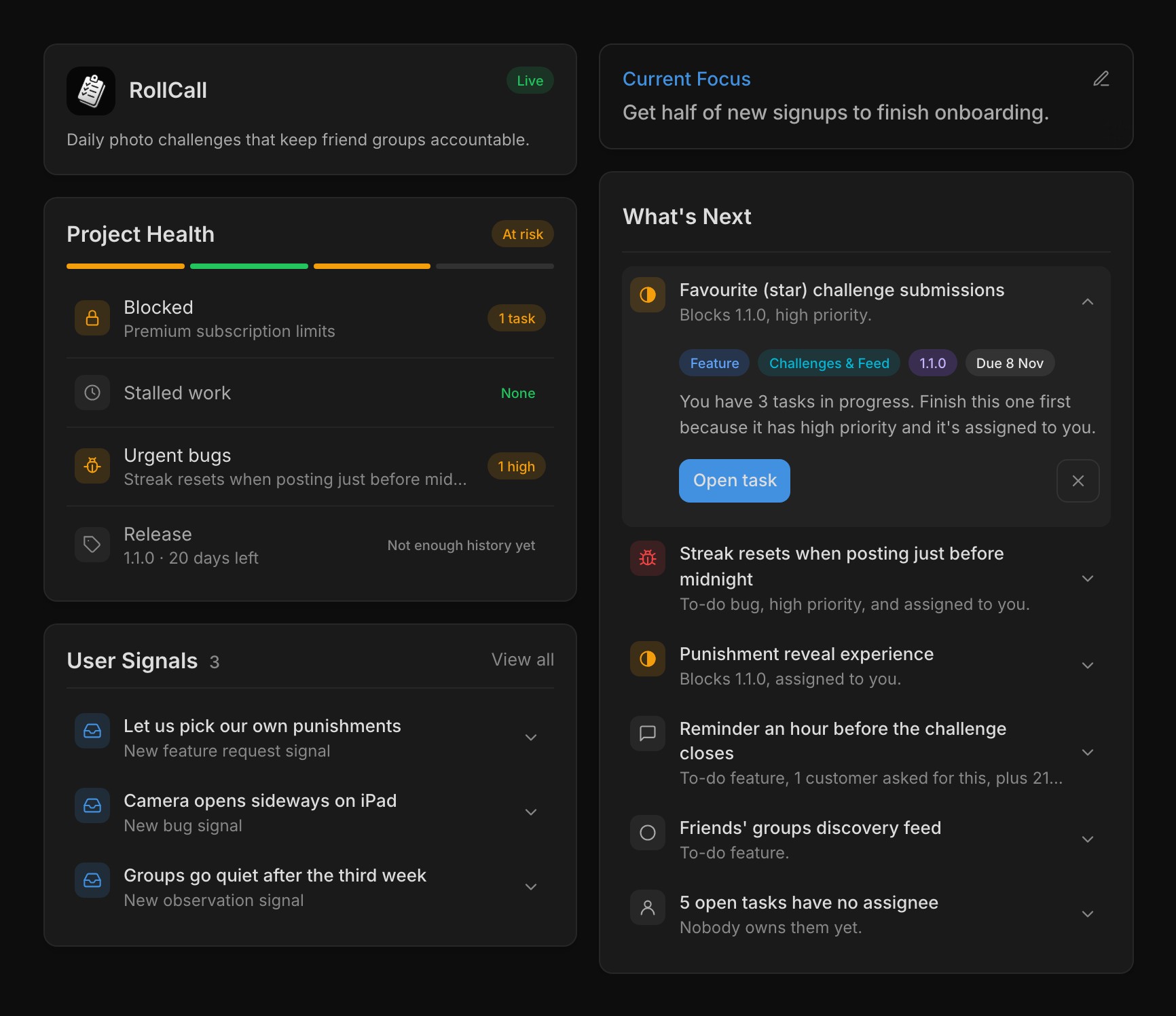
RollCall dashboard with Project Health at risk beside What's Next, its top task expanded to show why it's first

Every project's dashboard has Project Health, which checks your open work for blocked tasks, stalled work, urgent bugs and whether the active release is on pace for its target date. Release pace compares how many tasks a week the release still needs with how many you closed over the last two weeks. Each check is a segment of the bar and a row below it, and a failing row names the task behind it so you can open it straight away.

The tag at the top sums it up as Healthy, At risk, Stagnant or Unhealthy, and hovering it lists every reason. Project Health follows fixed rules and uses no AI credits. Beside it, What's Next ranks up to five open tasks by priority, the active release, due dates and what users have asked for, with work assigned to you and work already in progress ranked higher.

Expand a row to see why it's there, press Start to move it to In Progress, or dismiss it for yourself. At most one piece of advice sits above the list, such as a release that's ready to ship or past its target date, and some offer Ask Frostbyte, which has the Agent look first and change nothing until you say. A connected coding agent gets the same list from the whats_next tool.

Set your product's stage and focus

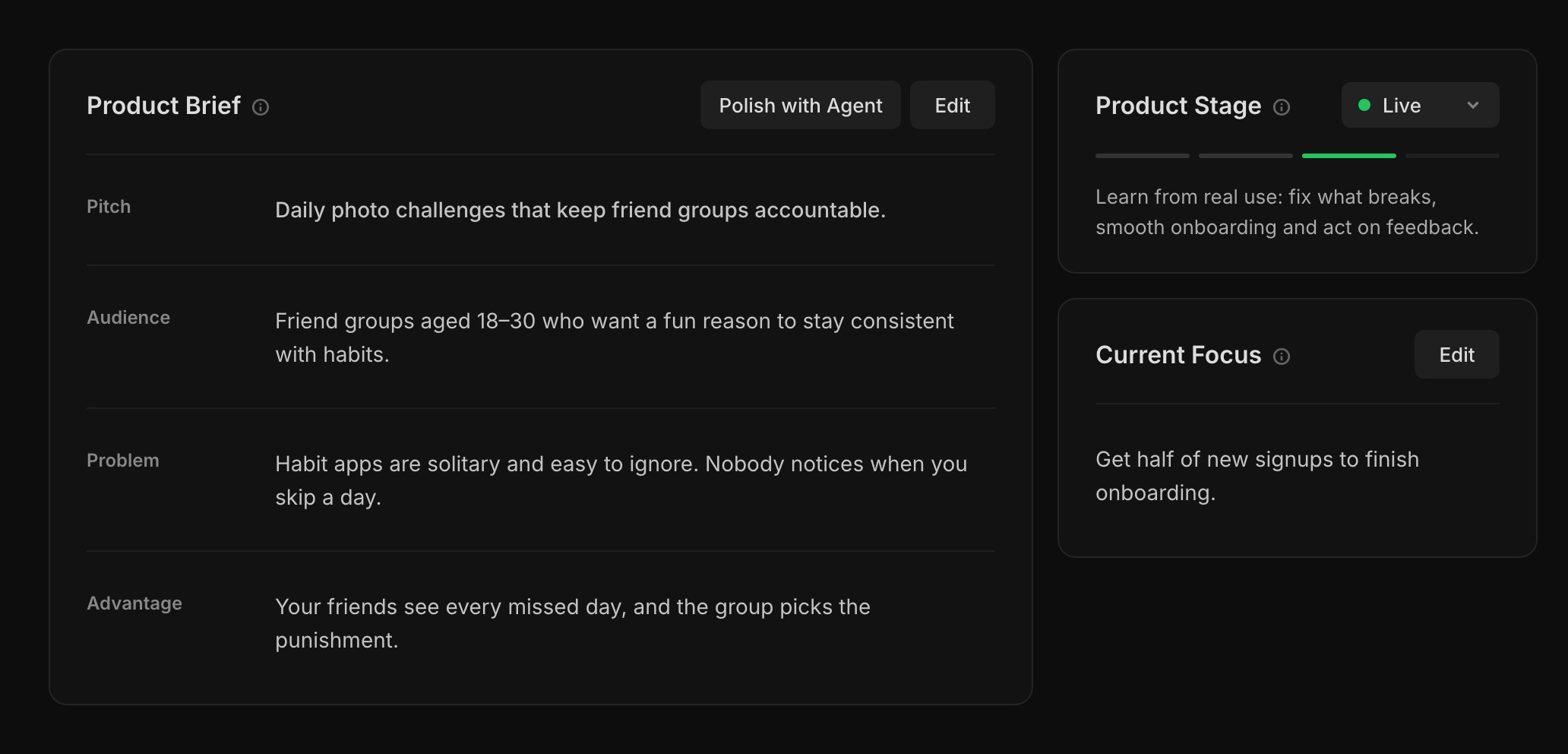
RollCall's Product page with the four-line Product Brief, Product Stage set to Live and a Current Focus

The Product page is a four-line brief you edit in place, covering what you're building, who it's for, the problem it fixes and why your approach wins. Set up with Agent asks a few quick questions and writes it for you. Everyone on the project can read it, and so can the Frostbyte Agent and any agent you connect, before they plan or suggest work.

Pick a stage from Idea, MVP, Live and Growth, and the line under it says what that stage is about. It describes where you're aiming now, so nothing locks and nothing changes it for you. Current Focus is the one goal you're working towards now, such as "Get half of new signups to finish onboarding", and it shows on the dashboard.

The stage shapes the advice you get. At MVP, work already in progress in the active release ranks higher in What's Next, and a release much bigger than you usually ship gets flagged. At Live, bugs and requested work rise. If what you're doing doesn't match the stage, such as shipping releases while set to Idea, the owner gets a hint to move it.

Changelog posts with a headline and cover

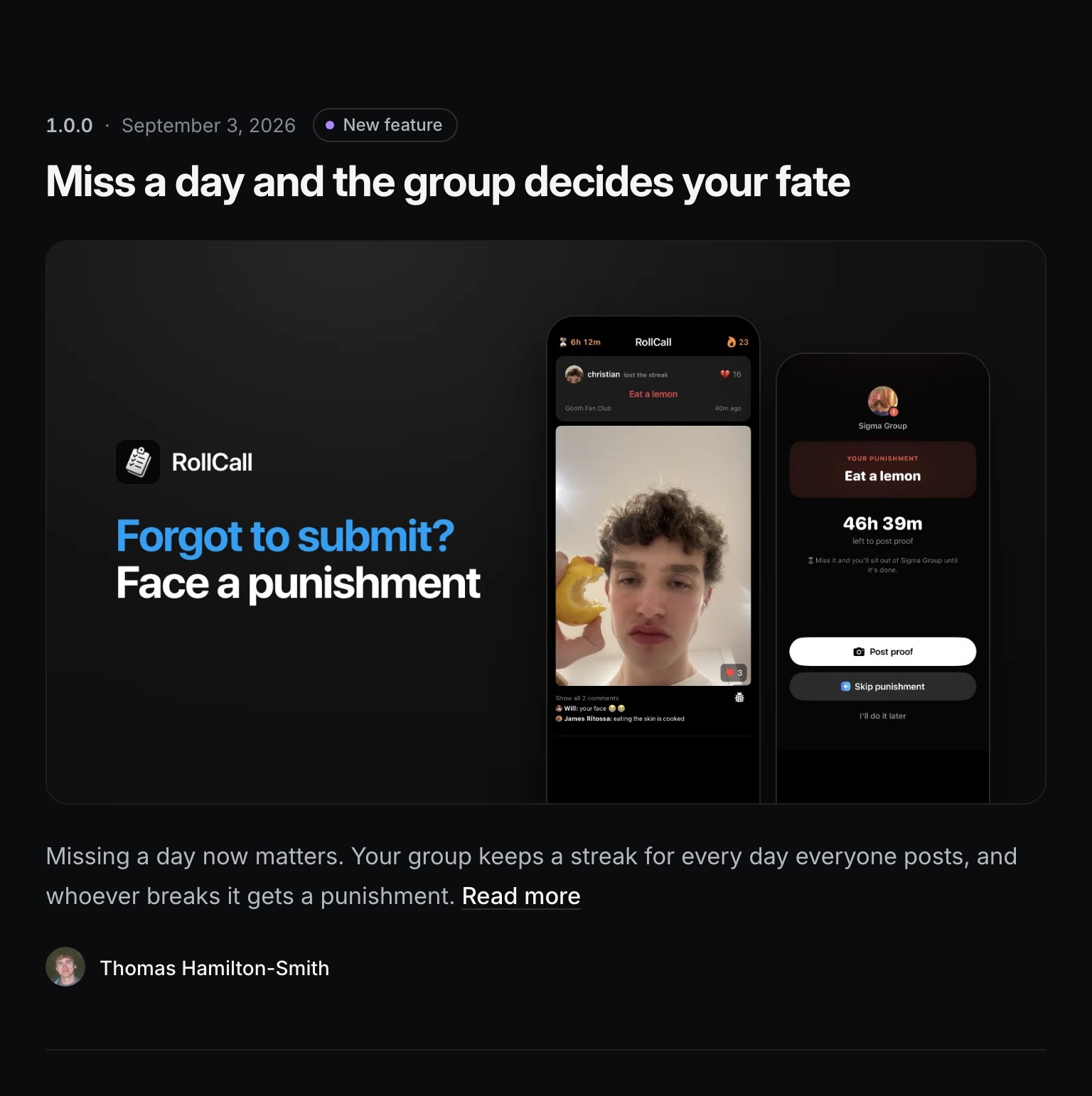
A RollCall changelog post on its Feedback Portal with a headline, cover image, opening paragraph and author

Release notes are posts on your Feedback Portal's changelog. Each one has a headline, an optional cover image, images inside the notes, and your name as the author. A post's own page lists everything in the release, with a Built from your feedback card showing the requests and votes behind it.

Auto generate drafts the headline and notes from the release's Done tasks and the portal requests linked to them. The changelog is on every plan. Covers and images need Indie, and a release can hold up to 10.

The rest of the portal has a new look too, with one composer, a feed beside a sidebar, and request pages that show where each request is up to, such as Planned or Shipped. While the public roadmap is on, a task drafted from a public request starts ticked to appear on it. Untick it in the draft to keep it off.

Connect your agent on Free

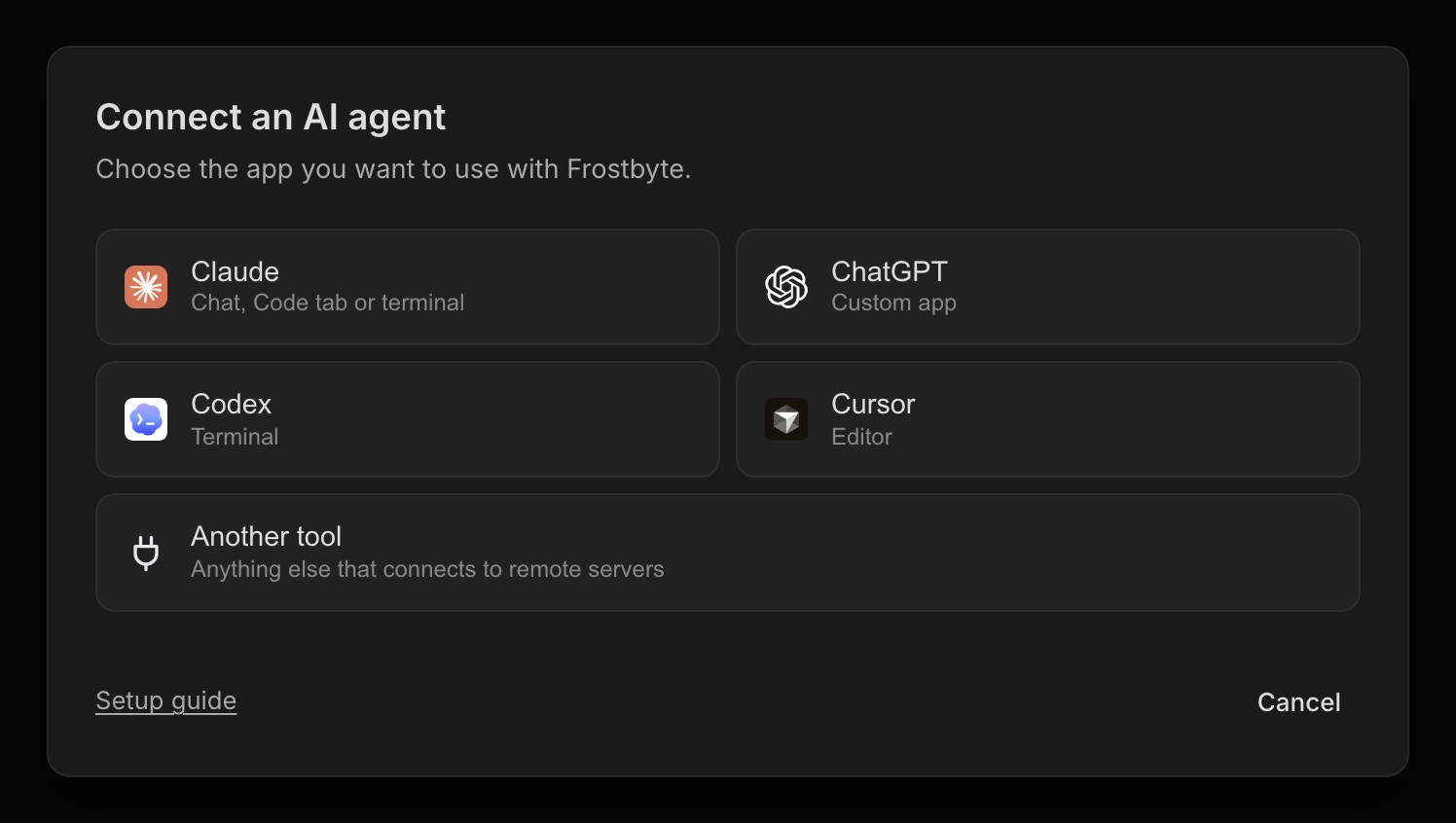
Connect an AI agent dialog offering Claude, ChatGPT, Codex, Cursor and another tool

Claude Code, Codex, Cursor, Claude chat and ChatGPT connect to Frostbyte on every plan, Free included. Open Settings → Connections → Connect your agent and follow the steps for your tool.

A Free project also holds three people, you and two others, and there's no limit on areas. Free includes 250 tasks and two open releases.

New features 14
  • Project Health checks blocked tasks, stalled work, urgent bugs and release pace Projects
  • What's Next on the dashboard, with a reason for each task, Start and personal dismissals Projects
  • A Product Brief you edit in place, or have the Agent write Projects
  • Product stages that shape What's Next, release advice and agent suggestions Projects
  • Current Focus on the Product page and dashboard Projects
  • Changelog posts with a headline, cover image and images in the notes Releases
  • Built from your feedback on each changelog post Feedback Portal
  • A Project settings page, under the ⋯ menu on any project page Settings
  • Connect your agent on every plan, Free included Agent
  • Delete a signal for good, or hide it from the portal Signals
  • The whats_next tool gives connected agents the same ranked list MCP
  • Agents take a task number like FB-7 wherever they take a task MCP
  • Turn off shipped emails for your portal with Email when requests ship Feedback Portal
  • Changelog updates under Settings → Email notifications, for an email when Frostbyte ships a release Emails
Improvements 16
  • Free projects hold three people and have no area limit Billing
  • A redesigned Feedback Portal with one composer, a sidebar and request statuses Feedback Portal
  • Tasks drafted from public requests start on the roadmap while it's on Signals
  • Auto generate drafts a headline and opens with why the change matters Releases
  • Agents write a release description when it's missing and keep it current Agent
  • Shipped emails go out once the release ships, not when a task is done Emails
  • Redesigned CSV import, CSV export and PDF export dialogs Projects
  • New areas and releases get a colour nothing else in the project uses Areas
  • New signups answer a few one-tap questions, then get a shorter checklist Onboarding
  • Clearer sign-in errors, and Google or GitHub signup keeps the trial you picked Auth
  • Verifying your email moves the waiting tab on by itself Auth
  • Unverified accounts get one reminder and are deleted after 27 days Auth
  • A failed payment keeps your plan for 14 days while the card is retried Billing
  • Downgrades take effect at the end of the period you've paid for Billing
  • Trial and payment emails state the amount, card, date and how to cancel Emails
  • Archived projects are read-only everywhere, including for agents Projects
Bug fixes 6
  • A new email address only takes effect once you've confirmed it Auth
  • Feedback Portal subdomains load for Free projects Feedback Portal
  • Unarchiving a project brings back its full sidebar and editable fields Projects
  • The task modal stays still while it loads, and empty GitHub sections stay hidden Tasks
  • Very long names no longer break task, release and area cards Tasks
  • Tapping on iPhone no longer flashes a grey highlight Navigation
v1.16.0

Quick Edit and Chat Connections

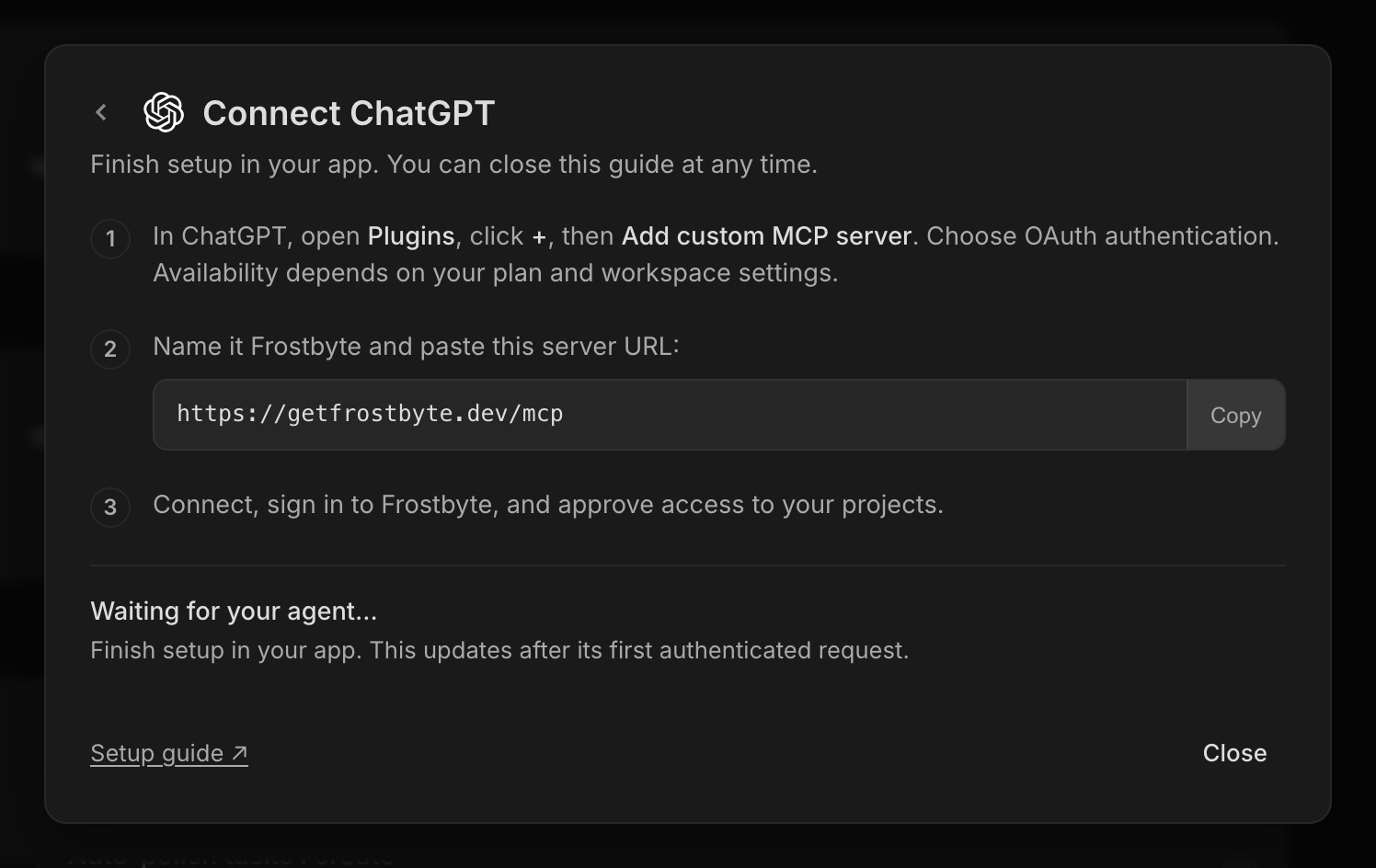
Connect ChatGPT dialog with three steps and the Frostbyte MCP server URL

Claude chat and ChatGPT can now connect to Frostbyte without a token. Open Settings → AI agents, pick one, add the MCP URL as a custom connector in that app, then sign in to Frostbyte and approve access.

Each connection shows up in Settings next to your tokens, with the app's name, and you can revoke it there. Claude Code, Codex and Cursor still connect with a token, the same way as before. This launched on Indie and above and is now on every plan, Free included.

Quick edit covers more of the task

Quick edit open on a task card, with status, type, priority, area and release beside it

Quick edit now has the description, area and release alongside status, type and priority, so most small changes no longer need the full task modal. Saved changes show on the card straight away and don't flicker back while the save finishes.

It opens on whichever side of the card has room. On phones it's off, and tapping a card opens the task as usual.

Help while you write a task

New Task modal suggesting Bug and an area as chips under a typed title

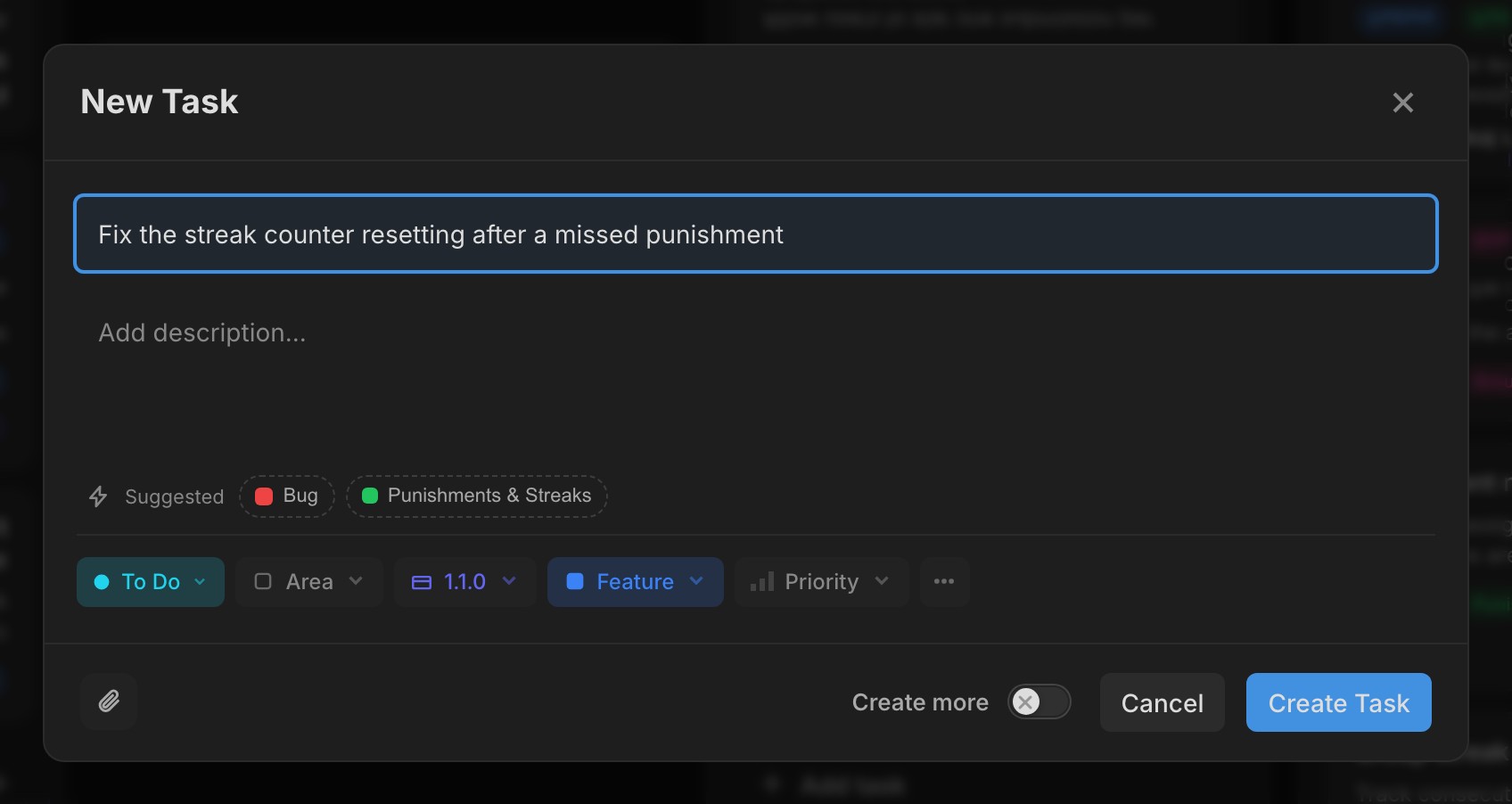
As you type in New task, Frostbyte suggests a type, area and release as chips under the title. Tap one to use it. It never changes something you've already set yourself.

Polish task is in the New task modal too, so you can tidy the title and description before creating it. If you'd rather it happened every time, turn on Auto-polish tasks I create in Settings → Preferences. Each polish uses about one AI credit from the project.

New features 8
  • Connect Claude chat and ChatGPT by signing in, with each connection listed in Settings Agent
  • Type, area and release suggestions while you write a new task Tasks
  • Polish task in the New task modal Tasks
  • Auto-polish tasks I create, under Settings → Preferences Settings
  • Description, area and release in quick edit Tasks
  • Copy prompt in the task ⋯ menu, ready to paste into your coding agent Tasks
  • One image viewer for task attachments and changelog images, with arrows between images Tasks
  • With release sync on, pull requests that reference tasks in one release get its milestone GitHub
Improvements 8
  • Portal settings are split into tabs with switches, and the widget has a live preview Feedback Portal
  • Implementation notes hold up to 8,000 characters Tasks
  • The active release note is now a one-time tip in the release picker Releases
  • Images show as thumbnails with a small spinner while they upload Tasks
  • Removing an attachment asks first Tasks
  • Polish progress sits in the task modal header, so nothing shifts while it runs Tasks
  • Dragging a task in a sorted column shows where it will land Tasks
  • Task Activity is tighter, with larger comment avatars Tasks
Bug fixes 3
  • The connect dialog no longer opens twice from Settings Agent
  • Tab order in quick edit matches the layout Tasks
  • Quick edit keeps focus on touch screens Tasks
v1.15.0

Agent Setup and Task Activity

Connect an AI agent dialog offering Claude, ChatGPT, Codex, Cursor and another tool

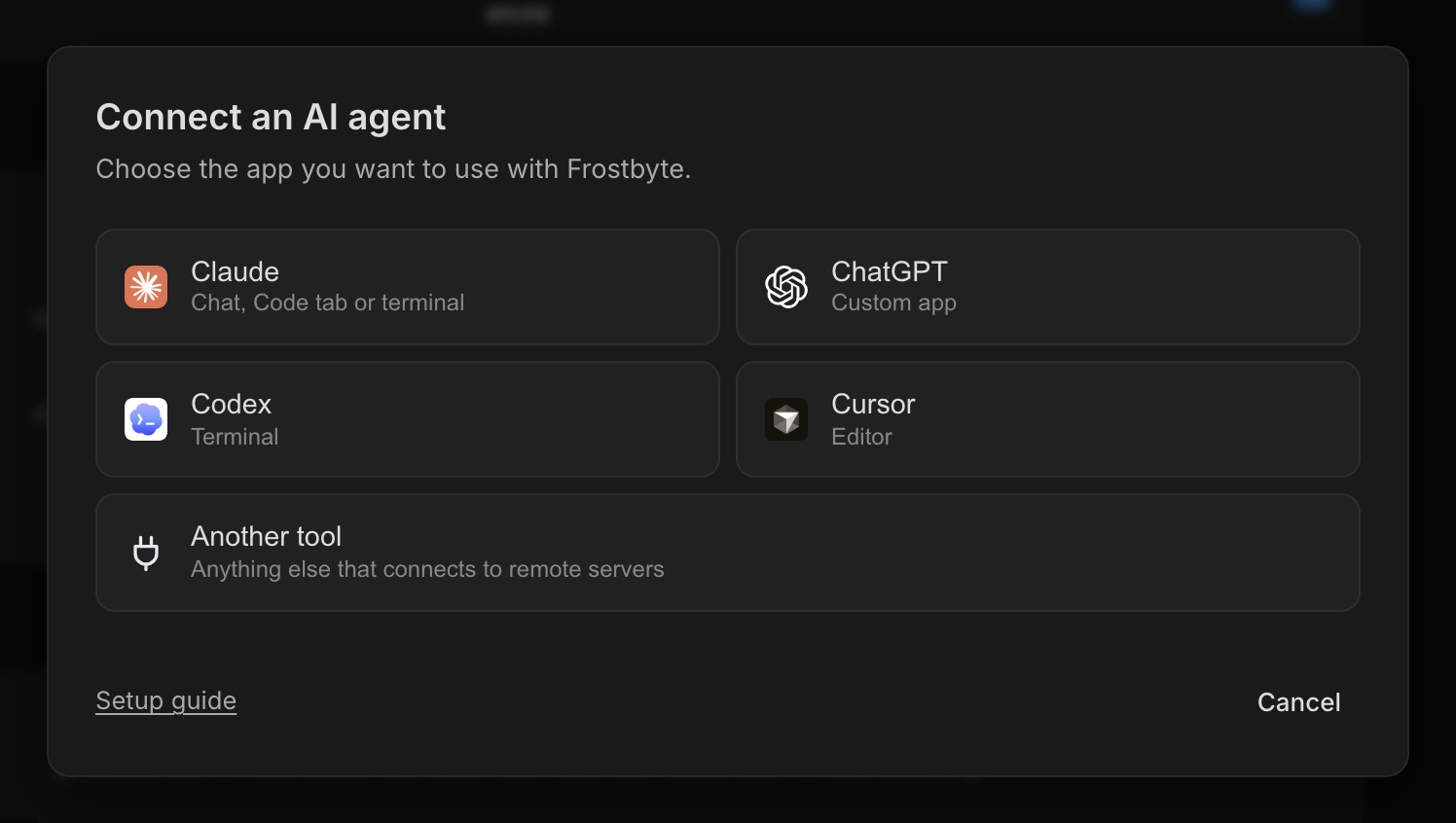
Settings → AI agents now starts by asking which tool you use: Claude Code, the Claude desktop app, Codex, Cursor or another MCP tool. Each one gets at most three steps with a copy button, and the token is already filled in for you.

The dialog waits for your agent's first call and then shows Connected. The Connect your agent step in the setup checklist opens the same dialog, and ticks itself off once your agent has been in touch.

Agents can also do more once they're connected. They can read task and signal attachments, clear a task's release or area, set a release's launch date, and delete tasks, areas or releases after you confirm in chat. Task, release and area names in their replies link straight to Frostbyte.

Comments and more than one assignee

Task Activity with a comment and the Add a comment box

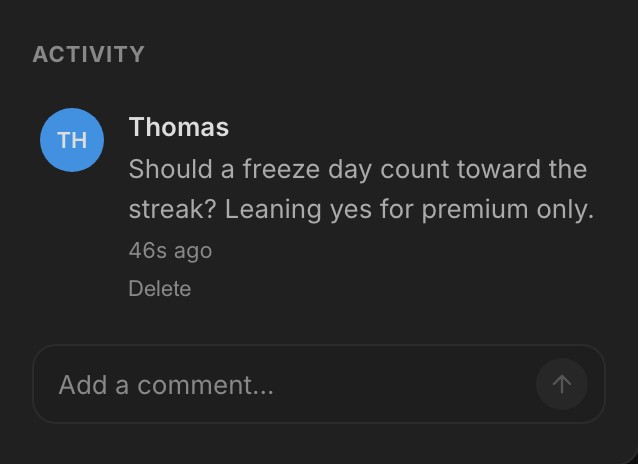
Tasks have comments. Type at the bottom of Activity, press Enter to send and Shift+Enter for a new line. Your agent's decisions land in the same thread with an Agent badge, long notes fold to two lines with Show more, and the list of changed files folds behind a count.

A task can be assigned to several people. Their avatars stack on the card, and assignee changes sync to linked GitHub issues.

Find work and keep releases tidy

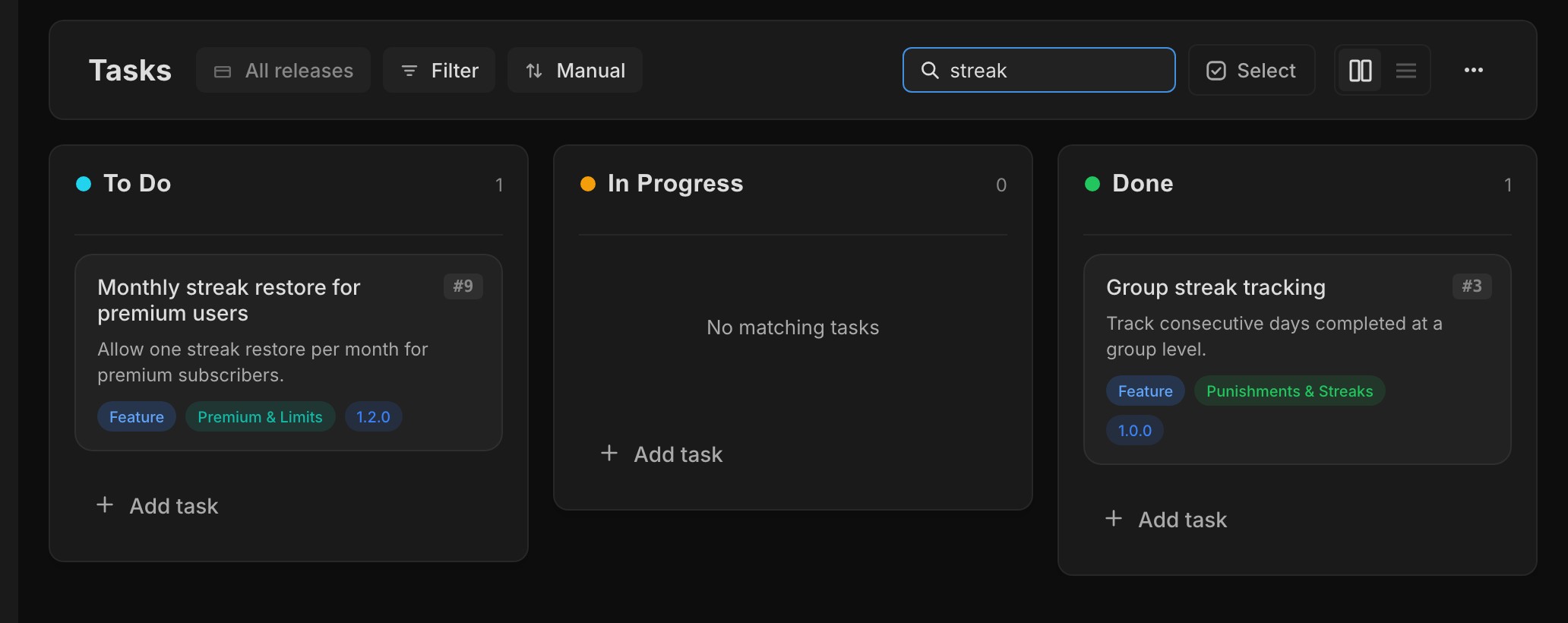
Tasks board searched for streak, with an empty lane saying No matching tasks

The Tasks page has a search box that narrows every lane to tasks whose title matches. A lane with no matches says so.

New tasks still join the active release by default. If you'd rather they start in the Backlog, turn off Add new tasks to the active release in Settings → Preferences. Completed releases are folded away in release pickers, and creating a release is one short flow.

New features 8
  • Pick your tool and follow up to three steps to connect your agent Agent
  • Comments on tasks, in the same Activity thread as agent decisions Tasks
  • Assign several people to a task Tasks
  • Search tasks in a project Tasks
  • Add new tasks to the active release, a personal setting in Settings → Preferences Settings
  • Paste an image into a task to attach it Tasks
  • Agents can read attachments, set launch dates, and delete tasks, areas and releases after confirming MCP
  • Open task counts on the Projects page Projects
Improvements 10
  • Completed releases are folded away in release pickers Releases
  • Creating a release is one flow, and empty Areas and Releases pages show a preview with a create button Releases
  • Every planning change is recorded in Activity Tasks
  • Attachments show as larger previews Tasks
  • Create more shows Task created as soon as you press it Tasks
  • Members can see a project's About page, export it and leave it Projects
  • The GitHub connection explains what happened and how to fix it when something fails GitHub
  • Task, release and area names in agent replies link to Frostbyte Agent
  • The project name and icon sit beside the menu button on mobile Navigation
  • Larger tap targets in pickers and agent replies Navigation
Bug fixes 9
  • Tasks you take out of a release no longer drift back into the active one Releases
  • An invite to a full project shows a clear screen instead of failing Projects
  • The sidebar fits the screen on iPhone Navigation
  • Release picker menus stay inside the task modal on mobile Releases
  • The keyboard stays down when the Agent opens on mobile Agent
  • First-use tips sit inside the dialog on mobile Onboarding
  • Product context fits phone screens Projects
  • Buttons on mobile size to their label Navigation
  • The pull request icon is drawn correctly GitHub
v1.14.0

Multi-select and Filters

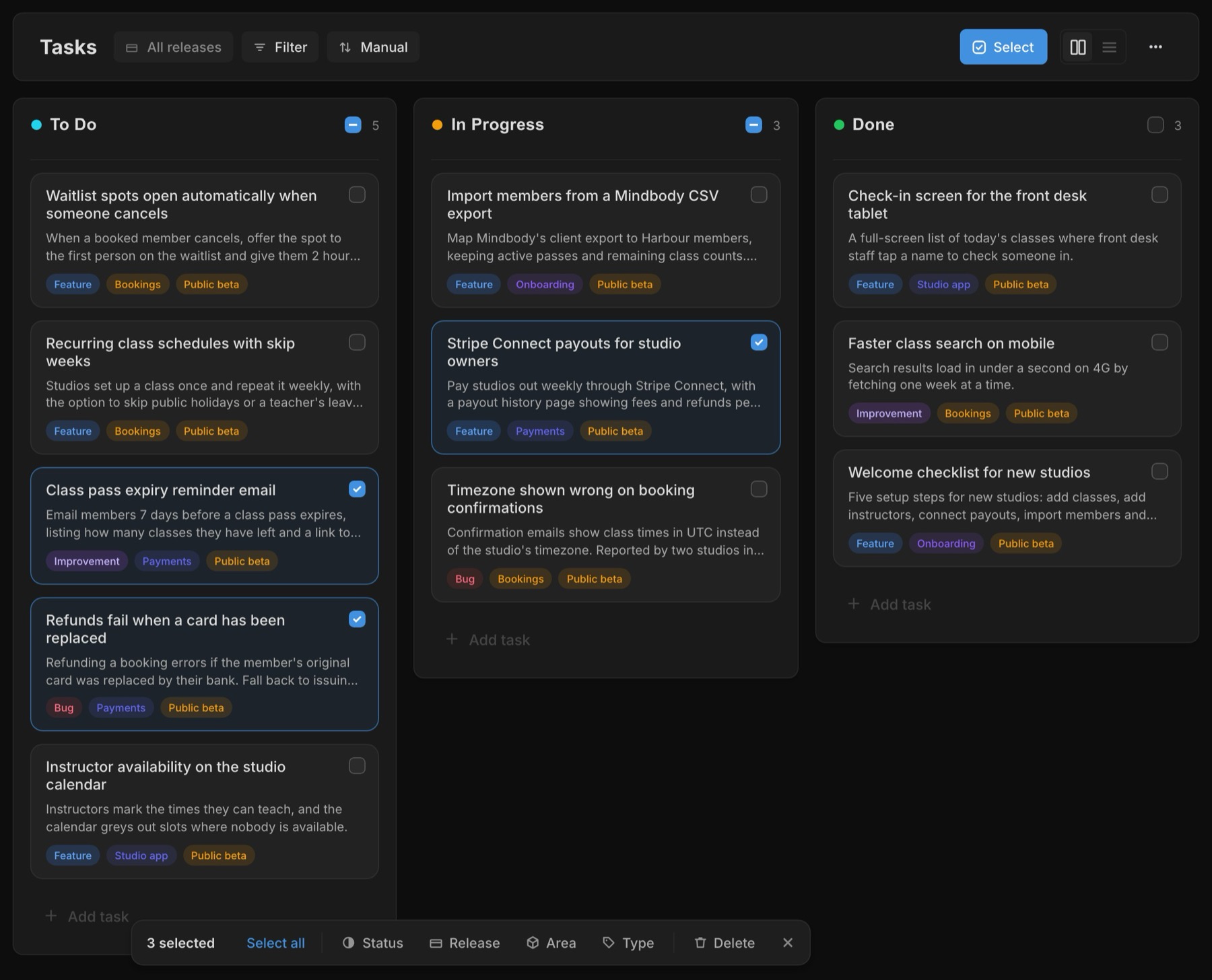
Tasks board with three cards selected and the bulk bar offering status, release, area, type and delete

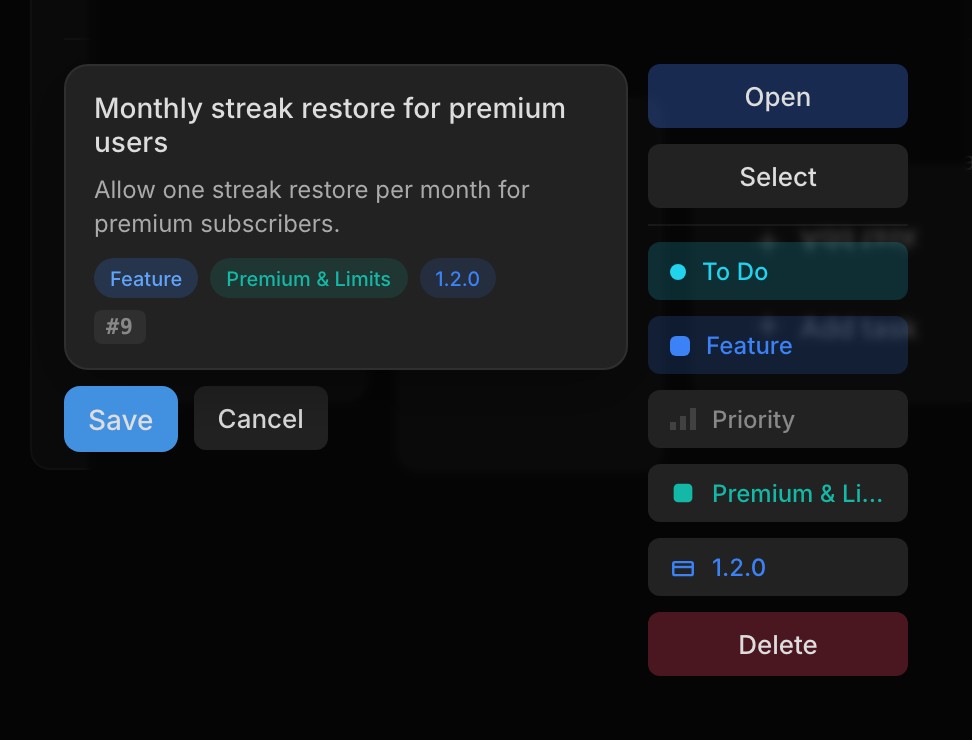
Press Select on the Tasks board, or Cmd/Ctrl-click a card, and clicking picks tasks instead of opening them. Shift-click selects a range, and on a phone or tablet a long press starts a selection.

A bar shows how many you've picked and lets you move them all to a new status, release, area or type, or delete them, up to 200 tasks at a time. You can also drag any selected card into another lane and the rest of the selection goes with it.

The Tasks header has a Filter menu for type and area, and you can pick more than one of each. Sort sets the order: Manual keeps your drag order, Last edited puts recently changed tasks first, and Newest puts the latest additions on top. A task you create while filtered picks up that type or area, so it doesn't vanish from view the moment you save it.

User Signals is now optional

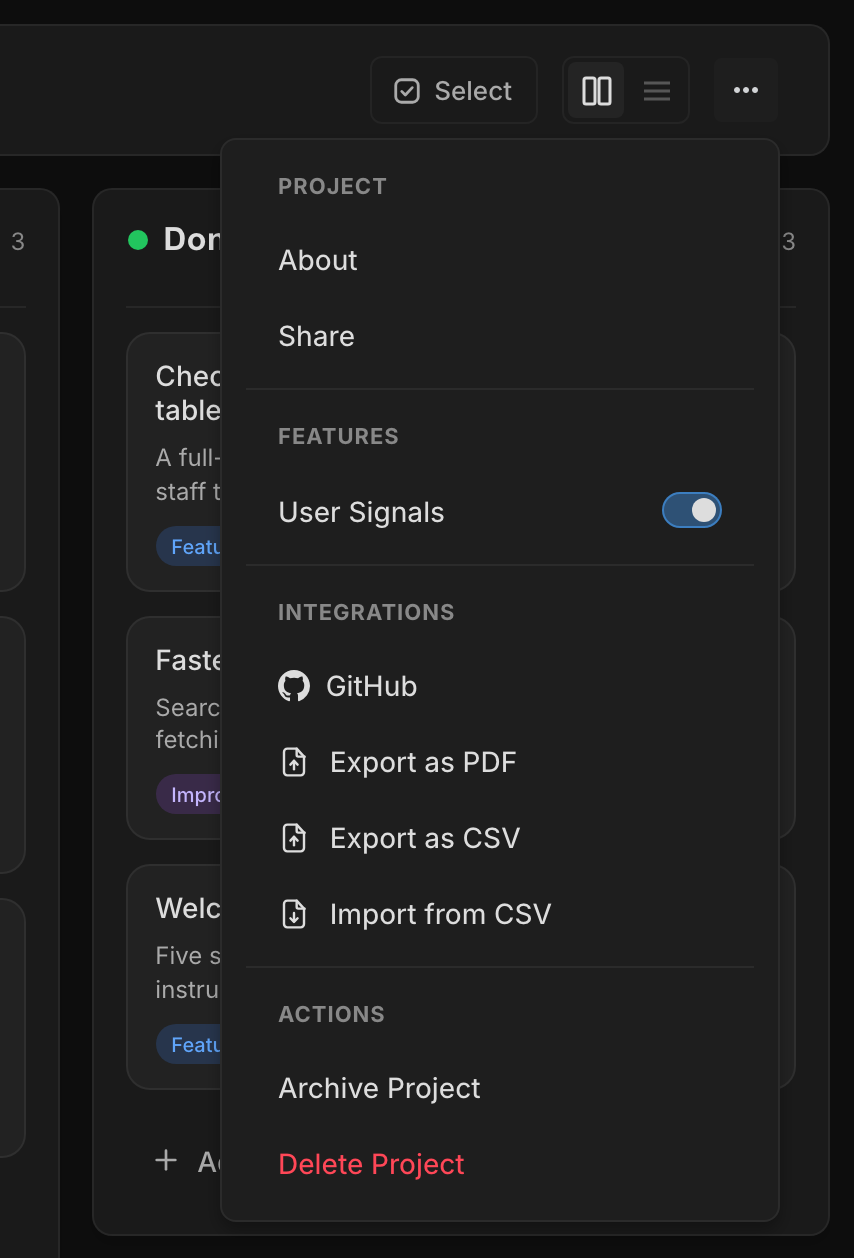
Project menu with a Features section containing the User Signals switch

Not every project needs a feedback queue on day one. Project owners can switch User Signals off under Features in the project ⋯ menu. While it's off, Signals disappears from the sidebar, the dashboard and your tasks, your public portal shows "Feedback paused" on the same URL, feedback-shipped emails stop, and the MCP tools and in-app Agent decline Signals requests.

Nothing is deleted. Switch it back on and your signals, votes and portal are as you left them. New projects at the Idea stage start with it off, and once a project moves past Idea the dashboard offers to turn it on with one click.

A tidier task modal

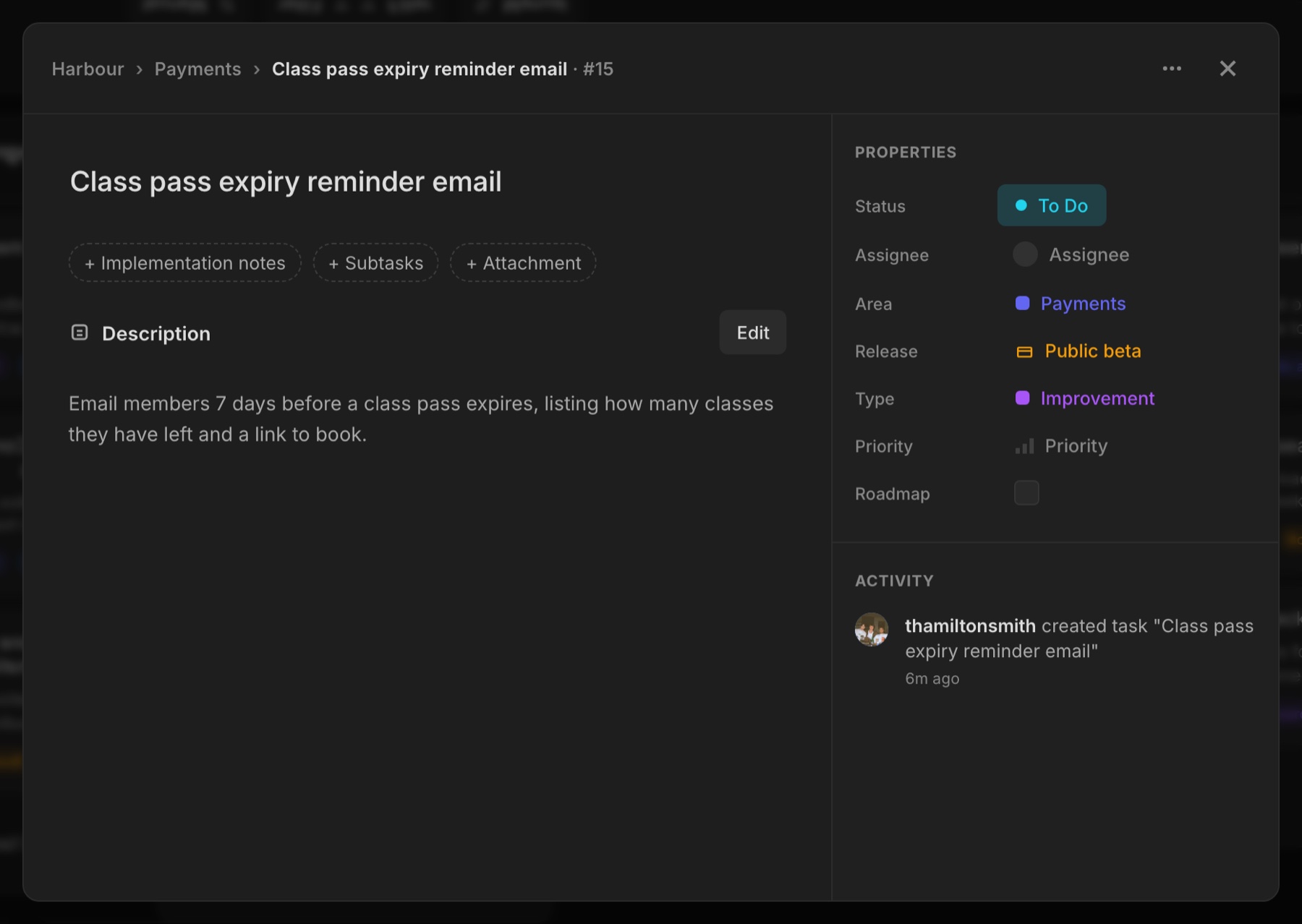
Task modal with + Implementation notes, + Subtasks and + Attachment chips under the title

Empty Implementation notes, Subtasks and Attachments sections no longer take up room on every task. They fold into small chips under the title. Click one and the section opens ready to type or pick a file, and if you back out without adding anything it folds away again.

You can drag files straight onto an open task to attach them. Drop them on the New task modal and they upload as soon as the task is created.

New features 7
  • Select several tasks with the Select button, Cmd/Ctrl-click, Shift-click for a range, or a long press on touch Tasks
  • Bulk bar to change status, release, area or type, or delete, for up to 200 tasks at once Tasks
  • Drag a selection into another lane to move every selected task Tasks
  • Filter tasks by type and area, with more than one of each Tasks
  • Sort tasks by Manual, Last edited or Newest Tasks
  • Switch User Signals off or on per project under Features in the ⋯ menu Signals
  • Drag and drop files onto a task or the New task modal to attach them Tasks
Improvements 7
  • Empty notes, subtasks and attachments fold into chips under the task title Tasks
  • New tasks pick up the type or area you're filtered to Tasks
  • New Idea-stage projects start with User Signals off, and the dashboard offers to turn it on once you move past Idea Signals
  • Invite link and Copy share one row in the Share popover, and Revoke asks first Projects
  • Clicking implementation notes opens the editor, like the description Tasks
  • Longer names: tasks up to 100 characters, areas 30 and releases 40 Projects
  • The project Visibility setting is gone. It never restricted access, and projects stay private to their members Projects
Bug fixes 2
  • The invite link now shows when you open a project from a task, area or release link Projects
  • A member removed from a project is taken out of it straight away Projects
v1.13.0

Public Changelog

Public portal changelog showing a timeline of releases with notes and task breakdowns grouped by type

Your Feedback Portal now has a Changelog tab, a public timeline of the releases you choose to publish. Each entry shows your release notes and the tasks that went out with it, grouped into new features, improvements and bug fixes with their area labels.

Nothing appears until you publish it. Complete a release that has notes and Frostbyte asks whether to put it on the changelog, or publish or remove any completed release later from its Changelog property. If a release moves back out of Completed, it comes off the page automatically.

Shipped emails link to the entry

When feedback ships and Frostbyte emails the person who asked for it, the email now links to that release's changelog entry.

On every plan

The changelog is on every plan, including Free. To keep it private, switch it off in your portal settings.

New features 5
  • Public Changelog tab on the Feedback Portal, built from your published releases Feedback Portal
  • Publish release notes when completing a release, or later from its Changelog property Releases
  • Task breakdowns under each changelog entry, grouped by type with area labels Feedback Portal
  • Shipped emails link to the release's changelog entry Emails
  • Changelog toggle in portal settings, on every plan Feedback Portal
Improvements 8
  • Moving a release out of Completed removes it from the public changelog Releases
  • Release activity records changelog publishes and removals Releases
  • Feedback Hub is now called Feedback Portal Feedback Portal
  • Every project gets a getfrostbyte.dev subdomain, on every plan. Custom domains stay on Studio Feedback Portal
  • The portal shows your project logo, and an account menu when you're signed in Feedback Portal
  • CSV import has a reworked column mapping step Projects
  • A release shows its launch date only once it has launched Releases
  • The setup checklist is down to five steps Onboarding
Bug fixes 3
  • CSV import keeps your data intact Projects
  • Task edits no longer fail with a stale-version error Tasks
  • Creating a release or area twice with the same name no longer makes duplicates Releases
v1.12.0

Images and Files

Projects can now have a logo and people can have a profile picture. Upload an image and Frostbyte resizes it and shows it everywhere that project or person appears.

Uploads are stored privately and served through Frostbyte, not from a public bucket.

Attachments on tasks and feedback

Tasks and Feedback Portal submissions now take attachments: images, PDFs, plain text and CSV files.

Task cards show a badge when something's attached, and clicking an image opens it full size instead of downloading it. People submitting to your public Feedback Portal can attach a screenshot too.

The navbar moved into the sidebar

The navbar is gone. Your account, your projects and your most-used quick actions are in the sidebar, and creating a project opens an overlay on top of the app instead of a separate page.

New projects open with a short guided setup and a Feedback Portal already provisioned, so you can share a link straight away.

Password reset and project limits

You can reset a forgotten password from the login page. If you hit your plan's project limit, you can archive a project from the Projects page to make room.

New features 8
  • Project logos and profile pictures Projects
  • Attachments on tasks: images, PDF, TXT and CSV, with a badge on the card Tasks
  • Attachments on public Feedback Portal submissions Feedback Portal
  • Click an attached image to open it full size Tasks
  • Password reset from the login page Auth
  • Archive a project from the Projects page when you reach your plan's limit Projects
  • Create a project in an overlay without leaving the app Projects
  • Quick actions in the project sidebar Navigation
Improvements 9
  • The navbar is gone and your account lives in the sidebar Navigation
  • Pending signals show on the dashboard Signals
  • Quick edit sets status, type and priority from the task row Tasks
  • New projects come with a Feedback Portal and a guided first run Onboarding
  • The feedback widget is rebuilt as a hosted panel Feedback Portal
  • Dismissed portal submissions stay visible as closed Signals
  • Areas are deleted instead of archived, from a menu on the area card Areas
  • Faster moves between project pages Performance
  • The Agent tells you when you're out of credits instead of starting a reply it can't finish Agent
Bug fixes 2
  • Long task titles no longer collide with the ID badge or clip in quick edit Tasks
  • Public profiles open for logged-out visitors Profiles
v1.11.0

Signals

User Signals replaces the old Inbox and the separate feedback and bug queues with one page you review. Feedback Portal submissions, bug reports and your own notes all land there.

Capture a signal yourself from the page, or let your coding agent capture one over MCP while it works. Each signal shows its type and source, and public submissions show their votes.

Every signal gets a decision

Open a signal and choose Create task, Link to existing task, Save for later or Dismiss, which asks for a reason. Each decision records who made it, when and why, and stays on the signal.

Accepted work goes to your Backlog

Accepting a signal creates a task in your Backlog, not your active release, and Tasks has a new Backlog view to hold it.

The linked signals stay on the task with their votes, so you can see what people asked for when you plan the next release.

New features 8
  • User Signals: one queue for Feedback Portal submissions, bug reports, your own notes and agent capture Signals
  • Create task, Link to existing task, Save for later or Dismiss with a reason Signals
  • Decision history on every signal: who decided, when and why Signals
  • Signal types for bug, feature, feedback and observation, with public vote counts Signals
  • Capture your own ideas and observations, on every plan Signals
  • Backlog view on Tasks for accepted work not yet in a release Tasks
  • Linked signals show on the task they produced Tasks
  • Signals MCP tools so your coding agent can read the queue and capture signals MCP
Improvements 4
  • Tasks show priority indicators instead of complexity estimates Tasks
  • Review opens in a modal with its own link, and changes show straight away Signals
  • Free projects hold 20 pending signals, and reviewing one frees a slot Billing
  • Feedback Portal submissions are always accepted, even at the limit Billing
v1.10.1

Setup and Settings

Settings is now grouped into compact rows instead of a long scroll of boxes, so your plan, email preferences and account controls are easier to find.

A popover in the sidebar shows your plan, what's included and how many AI credits you have left before the next reset.

The setup checklist moved to the dashboard

The setup checklist now sits on the dashboard instead of in a modal, and you can do each step from there. An empty project's dashboard also says what to do next.

Areas and releases explain themselves the first time you open them.

Emails that follow your setup

Lifecycle and billing emails were rewritten and there are more of them. They follow where you are in setup, and paid plans get notice before a trial ends and when a payment fails.

You now have to verify your email before you can use the product.

New features 4
  • Plan popover in the sidebar with your plan, features and remaining AI credits Billing
  • Setup checklist on the dashboard, with each step actionable in place Onboarding
  • Recent projects in the sidebar Navigation
  • Trial-ending, payment-failed and other billing emails for paid plans Emails
Improvements 10
  • Settings rebuilt as grouped, compact rows Settings
  • Email verification is required before you reach the product Auth
  • Lifecycle emails rewritten, and the sequence follows where you are in setup Emails
  • Creating a task asks for less up front Tasks
  • Areas and releases explain themselves at first use Onboarding
  • Areas and releases get varied colours Projects
  • CSV files are checked as you pick them, not after the import runs Projects
  • Project pages load faster Performance
  • Yearly pricing shows the real billing cadence Billing
  • The Agent is available on Free Agent
Bug fixes 6
  • Moving a task to Done applies immediately and survives conflicting edits Tasks
  • Creating and editing subtasks works reliably Tasks
  • Release launch dates are no longer overwritten Releases
  • Generated release notes describe what actually shipped Releases
  • Profile changes show across the app straight away Profiles
  • Hitting a project limit explains the limit instead of failing silently Billing
v1.10.0

Frostbyte Agent

Frostbyte Agent panel listing in-progress and to-do tasks in a project

Every project page has a Frostbyte Agent button in the bottom corner. Open it and ask what's active, what's blocked or what to ship next. It answers from your project's tasks, areas and releases, and it can change them for you.

Replies stream in as it works. Minimise the panel and the conversation stays, close it and the conversation clears. Past chats are in the history menu, where you can reopen or delete them.

The agent runs on AI credits, which now go by usage instead of a fixed cost per action. A bigger job costs more than a small one. Your monthly usage and reset date are in Settings.

You approve anything destructive

Routine changes, like creating a task, moving a status or drafting a release, apply as you watch. Anything destructive, like deleting work, waits until you approve it.

A Product page for what the agent should know

Product page with the product stage, One-line description, Target user, Problem to solve, Why this wins and Agent context

The new Product page holds your product stage, One-line description, Target user, Problem to solve and Why this wins. Agent context is a free-form field for anything else an agent should know.

The agent reads this page before it helps, so the tasks and releases it suggests fit your product.

New projects start with guided tasks

New projects open with a short set of tasks: Enter product context, Create your areas, Plan your first release and Connect your coding agent, which covers Claude Code and Codex. You can hand each one to the agent if you'd rather not do it yourself.

These replace the setup checklist and the auto project setup from v1.7.0.

New features 9
  • Frostbyte Agent on every project page, reading and changing tasks, areas and releases Agent
  • Routine changes apply straight away, destructive ones wait for your approval Agent
  • Chat history you can reopen and delete Agent
  • Quick-action prompts for common requests Agent
  • Product page with stage, one-line description, target user, problem and why this wins Product
  • Agent context field the agent reads before it helps Product
  • Guided tasks for new projects, each with a handoff to the agent Onboarding
  • Connect your coding agent task with Claude Code and Codex setup Onboarding
  • AI credits based on usage instead of a fixed cost per action AI Credits
Improvements 5
  • AI usage and reset date in Settings AI Credits
  • Agent replies stream in, minimise keeps the conversation and close clears it Agent
  • One set of product stages across the app Product
  • Agent context on tasks is now called Implementation notes Tasks
  • Guided tasks replace the setup checklist and auto project setup Onboarding
Bug fixes 4
  • The agent stays in the project you have open Agent
  • Markdown renders properly while a reply streams Agent
  • AI credits reset reliably each month Billing
  • Stopping a reply, approving a change and reopening a chat work reliably Agent
v1.9.0

Custom Domains & Embed Widget

Feedback Portal domain settings with a Frostbyte subdomain and a custom domain field

On Studio, your public Feedback Portal can now run on a subdomain you own. Point it at the portal, add the records Frostbyte shows you and verify.

If you'd rather not touch DNS, Indie and Studio projects can claim a name.getfrostbyte.dev subdomain in one field. Portals also moved to clean root-path URLs.

Embed feedback on your own site

On Studio, a new widget puts your bug, feature and general feedback forms on your own site with one script tag, copied from Feedback Portal settings. Your users can submit without leaving your app.

Remove the Frostbyte branding

Studio projects can also remove the "Powered by Frostbyte" branding from their portal.

New plan names and limits

Basic is now Indie and Pro is now Studio. Projects can have 1 collaborator on Free, 5 on Indie and 10 on Studio, and Free projects can have 100 active tasks.

New features 5
  • Custom domains for public Feedback Portals, with DNS verification (Studio) Feedback Portal
  • One-field name.getfrostbyte.dev subdomain (Indie and Studio) Feedback Portal
  • Embeddable feedback widget with a one-line script tag (Studio) Feedback Portal
  • Remove "Powered by Frostbyte" branding from public portals (Studio) Feedback Portal
  • Public portals served from clean root-path URLs Feedback Portal
Improvements 4
  • Feedback Portal settings have domain, embed and branding controls Feedback Portal
  • Basic and Pro are renamed Indie and Studio Billing
  • Collaborators per project are 1, 5 and 10, and Free has 100 active tasks Billing
  • Task and release lists and headers fit better on mobile Navigation
Bug fixes 3
  • Embed widget colours and spacing match the portal and docs Feedback Portal
  • Public portal links and subdomains work properly Feedback Portal
  • Project pages and API routes check membership before loading anything Security
v1.8.0

Agent Auto-Tracking

Until now, you had to remind your agent which Frostbyte project it was working in at the start of every session. Add a small .frostbyte.json file to the repo, commit it, and new Claude Code or Codex sessions start with the right project.

The link file holds only the project ID. On session start, a hook reads that ID and tells the agent which project to use. The authenticated read still happens through the MCP server you already connected, so the hook never touches your API token or sends code anywhere.

Your agent keeps the task list current

Once the agent knows the project, it can update the task list while it works. It starts the task you asked for, suggests a new one when the work is big enough to track, adds subtasks to work in progress and marks finished tasks done with a short note on what changed.

New tasks go into the best-fitting existing area when there is one. Releases are left alone unless you ask. Creating a project, linking a repo, opening a task or creating an area still needs your explicit yes.

Onboarding, and a few MCP fixes

In a repo that isn't linked yet, the new onboarding skill offers to sort it out at a natural point. For a fresh codebase, it can create a Frostbyte project and seed the first tasks. For an existing one, it can match the repo to one of your projects and write the .frostbyte.json file.

We also corrected the plugin's area and release tool references so the agent calls MCP tools that exist, and added Auto-tracking docs with the Claude Code and Codex setup paths.

New features 4
  • .frostbyte.json repo link file for connecting a codebase to a Frostbyte project Agent
  • Session grounding for Claude Code and Codex through the plugin hook Agent
  • Task policy for agents: start matching tasks, propose new ones, add subtasks and complete finished work MCP
  • Onboarding skill that offers to create a new Frostbyte project or link an existing one Agent
Improvements 5
  • The hook only passes the project ID, and MCP handles authenticated reads Security
  • Agent-created tasks land in the best-fitting area, with new areas only when nothing fits MCP
  • Dead or revoked project links are flagged so you can relink the repo MCP
  • Turn grounding off for one repo with grounding: false Agent
  • Signing in with Google or GitHub creates an account if you don't have one Auth
Bug fixes 2
  • The plugin calls the right MCP tools for area and release actions MCP
  • The MCP server connects through Codex MCP
v1.7.0

Auto Project Setup

Optional AI setup modal for generating a focused project plan

New projects now open as soon as you create them. You can rename things, invite people and write tasks without waiting for AI setup, which is now an optional step.

If you want help, the AI setup flow opens once the project exists. Describe the product, review the generated areas, releases and starter tasks, then apply the plan.

A starter workspace you can edit

Project dashboard created from AI-generated starter areas, releases, and tasks

After setup runs, the project has scoped tasks, product areas and an active starter release. All of it is editable.

Setup can fail without breaking your project

If a setup run fails or has to roll back, the project stays usable and the modal tells you how to retry.

Before saving generated work, Frostbyte checks it against your plan's area and release limits and tells you if it won't fit.

New features 3
  • New projects open before optional AI setup begins Projects
  • AI setup modal for generating starter areas, releases and tasks after the project exists AI Setup
  • Generated work rolls back when it can't be applied cleanly AI Setup
Improvements 3
  • Generated work is checked against your plan's area and release limits before saving Billing
  • AI setup retry and error states say what to do next AI Setup
  • AI setup modal works better with keyboards and screen readers Accessibility
Bug fixes 1
  • A failed AI setup run no longer leaves the new-project flow stuck AI Setup
v1.6.0

Feedback Loop

AI-assisted setup can turn a product description and connected repo context into starter areas, releases and tasks, so your agent has a backlog before its first session. New MCP planning tools let your agent do this work too.

Releases are easier to start and write up

Release notes panel with public status and Auto generate action

The New Release modal suggests the next name, and descriptions can be prefilled from completed task titles. Releases also have a public release notes field, and Auto generate drafts the notes from what shipped.

When an agent creates a release over MCP without a name, create_release suggests one too.

More ways to act on feedback

Public Feedback Portal with feedback cards and voting controls

People can vote on your public roadmap. In your project's review queue, now User Signals, you can moderate submissions, rewrite them with AI, convert them into task-ready copy and link them to existing tasks. When linked feedback ships, the person who sent it gets an email.

AI actions now draw on a pooled credit balance with limits per plan. Setup, release and feedback actions show their cost inline, and Frostbyte tells you when you've run out.

New features 14
  • AI-assisted setup that generates starter areas, releases and tasks from product and repo context AI Setup
  • MCP planning tools for agent-driven project work MCP
  • Auto generate button for release notes Releases
  • Next-name suggestions in the New Release modal Releases
  • Prefill a release description with completed task titles Releases
  • MCP create_release suggests a name when you leave it out MCP
  • Public release notes field on releases Releases
  • Public roadmap voting Feedback Portal
  • Moderation actions in User Signals Signals
  • AI rewrite for feedback submissions, and conversion into task-ready copy Signals
  • Link existing tasks to feedback submissions Signals
  • Email people when their linked feedback ships Feedback Portal
  • Pooled AI credits with limits per plan AI Credits
  • Multi-page docs with grouped navigation, search and a table of contents Docs
Improvements 4
  • Inline AI credit costs in setup, release and feedback flows AI Credits
  • Signal review, voting, task linking and empty states reworked Signals
  • Release notes editor has consistent markdown, autosave and realtime updates Releases
  • Task sorting and open modals stay correct during realtime updates Tasks
Bug fixes 4
  • Credit checks block gated AI and MCP actions every time AI Credits
  • Duplicate votes are rejected and voting is rate limited Feedback Portal
  • Signal actions, task linking and realtime updates work reliably Signals
  • Older docs links and anchors resolve Docs
v1.5.0

CSV Import and Onboarding

Export Tasks as CSV modal with filters for task type, release, area, and status

CSV import and export now live in each project's settings dropdown. Bring tasks in from another tool, or export them with filters for type, release, area and status.

Import progress stays with the project you're working in, and how much you can import depends on your plan.

A setup checklist for new projects

Getting started checklist showing completed setup steps

New projects have a setup checklist that remembers what you've done. It replaces the old quick-start modal, and the new-project and onboarding modals were refreshed.

Emails for assignments, feedback and setup

Frostbyte now emails you when you're assigned a task or someone submits to your Feedback Portal. Lifecycle emails bring you back to unfinished setup and release work, and paid plans get billing emails. A new unsubscribe page controls what you receive.

New features 7
  • Import tasks from a CSV file, with limits per plan CSV
  • Export tasks to CSV with filters CSV
  • Setup checklist in the project that remembers your progress Onboarding
  • Emails for task assignments and Feedback Portal submissions Emails
  • Lifecycle emails for adding tasks, finishing setup and starting a release Emails
  • Billing-status emails for paid plans Billing
  • Unsubscribe page for managing email opt-outs Emails
Improvements 4
  • New-project and onboarding modals refreshed Onboarding
  • Setup actions in the project replace the quick-start modal Onboarding
  • GitHub links stay correct when task cards update in realtime GitHub
  • Billing and lifecycle messages use the same plan language Billing
Bug fixes 4
  • Task cards keep their order and open modals stay current during realtime updates Tasks
  • Unsubscribe tracking is accurate Emails
  • GitHub OAuth data is kept during signup Auth
  • Email confirmation works for accounts that couldn't confirm before Auth
v1.4.0

Releases Upgrades

Redesigned releases page with active release hero

The Releases page now opens with your active release next to its in-progress and open tasks, in priority order. You can see what's left to ship without opening each one.

Each release card has a ⋯ menu to edit it, set it as active or delete it without leaving the page. Setting a new release as active demotes the previous one for everyone in the project straight away.

A list view for tasks

Task board with list view toggle and collapsible sections

The Tasks page has a new list view. Switch between board and list from the toolbar, and it remembers your choice. Both views have collapsible sections, so you can fold away any status you're not working on.

Each section has a + button that adds a task with that status. The count in each section header updates as cards move.

Active release in the sidebar

The project sidebar now shows your active release with its name, target date and a progress bar that updates as tasks complete.

New features 5
  • Active release at the top of the Releases page, with its top in-progress and open tasks Releases
  • List view for tasks that stays selected between sessions Tasks
  • Active release in the sidebar with its target date and a live progress bar Sidebar
  • Edit, Set as active and Delete menu on release cards Releases
  • A + button on each section to add a task with that status Tasks
Improvements 4
  • Collapsible status sections on Tasks Tasks
  • Task counts in section headers, updated in realtime Tasks
  • Target date badges show overdue in red, due today in amber and upcoming in the default colour Releases
  • Task number badges (#123) on board and dashboard cards Tasks
Bug fixes 4
  • A newly active release demotes the old one in every open session Releases
  • The sidebar widget refreshes when tasks and releases change Sidebar
  • Area description changes show on task cards without a page reload Areas
  • Active release names are escaped so they display correctly Releases
v1.3.0

MCP Server

Frostbyte now has an MCP server. MCP (Model Context Protocol) is the open standard AI assistants use to connect to other tools, so Claude and any other MCP client can work with your projects directly.

Ask Claude to create a task, move one to Done, list what's in progress or set up a release. It reads and writes your Frostbyte data.

The server has 16 tools. They list and create projects, tasks, areas and releases, update them, delete tasks and read a project's activity feed.

Connect it with an API token

There's nothing to install. Go to Settings → API Access and click Generate token. The token is only shown once, so keep a copy.

Then point your client at https://getfrostbyte.dev/mcp with the token as a Bearer header. The docs have the full setup. API tokens are on the Basic and Pro plans, and Revoke token cuts off access at any time.

New features 8
  • Hosted MCP server with 16 tools MCP
  • Generate and revoke API tokens in Settings → API Access, on Basic and Pro Settings
  • API routes accept a Bearer token API
  • Project tools: list_projects, get_project, create_project, update_project MCP
  • Task tools: list_tasks, get_task, create_task, update_task, delete_task MCP
  • Area tools: list_areas, create_area, update_area MCP
  • Release tools: list_releases, create_release, update_release MCP
  • get_activity reads a project's recent activity MCP
Improvements 2
  • PATCH routes for tasks, areas and releases accept partial updates API
  • GET routes for tasks, areas and releases API
v1.2.0

Feedback Portal & Public Roadmap

Feedback Portal for collecting user feedback

The Feedback Portal is a page you can share where people report bugs, suggest features and give general feedback. Submissions land in a review queue, now User Signals, where you accept them into tasks or decline them.

Each form asks for different things. Bug reports ask for severity and repro steps, feature suggestions ask for the use case and why it matters, and general feedback is open. Pro gets all three, and Basic gets bug reports.

A public roadmap

Public roadmap showing planned features

Turn on roadmap visibility for a task and it appears on a roadmap page in your Feedback Portal, grouped into Planned, In Progress and Completed.

Tasks move between columns when their status changes. The rest of your project stays private.

Send accepted submissions to a release

Accepted submissions can join your active release automatically, with separate switches for bugs and feature requests. New submissions appear in your queue in realtime.

New features 12
  • Public Feedback Portal with a shareable link Feedback Portal
  • Bug reports, feature suggestions and general feedback, each switchable on or off Feedback Portal
  • Direct links that open a specific submission form Feedback Portal
  • Moderation queue with accept and decline, filterable by type Signals
  • Accepted submissions become tasks, with severity mapped to priority Signals
  • Link an existing task when accepting a submission Signals
  • Optional submitter name and email for follow-up Feedback Portal
  • Attach accepted submissions to the active release, with separate bug and feature switches Signals
  • Public roadmap page grouped into Planned, In Progress and Completed Public Roadmap
  • Roadmap visibility switch in the task create and edit modals Public Roadmap
  • Realtime notifications for new submissions Signals
  • Copy buttons for Feedback Portal and roadmap links Feedback Portal
Improvements 10
  • Rate limiting on submissions to block spam Feedback Portal
  • Submission counts and last-received date in the queue Signals
  • Severity badges and submitter details on submission cards Signals
  • Feedback forms check your input and show errors before submitting Feedback Portal
  • A success message appears before the submission modal closes Feedback Portal
  • Quick feedback buttons on the roadmap page Public Roadmap
  • Empty states for the feedback queue and roadmap sections Signals
  • Forms and roadmap cards fit smaller screens Feedback Portal
  • Enabling the Feedback Portal requires a verified email Auth
  • Click outside a modal to close it Navigation
Bug fixes 6
  • Submission modal resets between form types Feedback Portal
  • Roadmap visibility saves when you edit a task Public Roadmap
  • A submission stays in the queue if its task can't be created Signals
  • Disabling the Feedback Portal turns off its public link Feedback Portal
  • Browser back and forward work with modal URLs Navigation
  • Submission cards stay in order during realtime updates Signals
v1.1.1

Task Assignments and PDF Export

You can assign a task to a teammate when you create or edit it. Their avatar or initials show on the card and in the activity feed, and assignee changes sync with GitHub.

GitHub links in task modals

Task modals now show linked GitHub commits, pull requests and issues. The sync controls are clearer about what gets pulled in and when, and syncing existing tasks and releases shows its status as it runs.

Export a project to PDF

The new Export modal turns a project into a PDF, with filters and three modes: kanban, diagram and full. Diagram mode draws the project with Mermaid.

New features 4
  • Assign people to tasks from the create and edit modals Tasks
  • Assignee avatars or initials on task cards Tasks
  • Export a project to PDF in kanban, diagram or full mode Export
  • Linked GitHub commits, PRs and issues in task modals GitHub
Improvements 5
  • Assignees sync between Frostbyte and GitHub GitHub
  • Clearer status when syncing existing tasks and releases GitHub
  • GitHub project dropdowns cache your repositories GitHub
  • Export filters and Mermaid diagrams Export
  • Profile photos show in activity and on assignees Tasks
Bug fixes 1
  • GitHub links in task modals show a loading state GitHub
v1.1.0

GitHub Integration

You can now link GitHub repos to Frostbyte projects and keep tasks in sync with issues and pull requests. Task badges now use a # prefix (#123), so you can reference tasks in commits and PRs the way you would on GitHub.

Set it up from Frostbyte

Install the GitHub app from your project or account settings, then use the GitHub integration modal in the project dropdown to choose which repos link to which projects. You can have more than one installation. GitHub features need a verified email.

New features 5
  • Tasks sync with GitHub issues and pull requests GitHub
  • Install the GitHub app from project or account settings GitHub
  • More than one GitHub installation per account GitHub
  • GitHub integration modal in the project dropdown GitHub
  • Link and unlink GitHub in account settings Auth
Improvements 4
  • Task badges use # for GitHub-style references GitHub
  • Settings shows the repositories you've authorised GitHub
  • Loading states and confirmation during sync GitHub
  • Reset button for release date inputs Releases
Bug fixes 3
  • GitHub setup shows clearer errors GitHub
  • Task sync copes with malformed data GitHub
  • Repository linking respects your GitHub permissions Auth
v1.0.1

Bug Reporter

Each project can have a public bug reporter, a simple page people can use to send you bug reports. The setup modal says where reports end up, you can switch it on or off, and the form no longer asks for fields nobody used.

Project members and a free plan

You can now invite people to a project, revoke an invite and manage members. There's also a free plan, with up to 3 projects.

Your account

Accounts now have email verification and Google and GitHub linking. There are new profile and settings pages, and you can delete your account from Settings after confirming.

New features 7
  • Public bug reporter with a setup and sharing modal Bug Reporter
  • Project invites and member management Projects
  • Free plan with up to 3 projects Billing
  • Email verification Auth
  • Link Google and GitHub to your account Auth
  • Delete your account, with a confirmation step Settings
  • Profile and settings pages Settings
Improvements 5
  • Fewer fields on bug reports Bug Reporter
  • Date pickers have a clear button Tasks
  • Smoother drag-and-drop reordering for tasks Tasks
  • Loading states in modals while an action runs Navigation
  • Page navigation handles errors better Navigation
Bug fixes 4
  • The date picker's today and clear buttons work properly Tasks
  • Edit modals show their activity list Tasks
  • Disabled project dropdown actions can't be clicked Projects
  • Drag-and-drop order stays in sync across views Tasks
v1.0.0

Launch

The first version of Frostbyte is live. It's a lightweight project planner for developers and small teams, whether you're building a SaaS product, a mobile app or a game.

Tasks, areas and releases

Frostbyte is built around three things. Tasks are the work, whether that's a feature, a bug or an improvement. Areas group related work by system or component. Releases collect work into a milestone with a target date and progress.

A dashboard for each project

Each project has a dashboard showing its health, active release, current tasks and bugs and recent activity, plus a board view for its tasks. A Quick Start guide helps you set up the first areas and tasks.

You edit work in modals, changes show up for everyone in realtime, and you can sign in with email or Google.

New features 9
  • Projects with dashboard, tasks board, areas and releases views Projects
  • Tasks with status, priority, type and subtasks Tasks
  • Areas to organise work by system or component Areas
  • Releases with progress tracking and target dates Releases
  • Quick Start guide for new projects Onboarding
  • Realtime updates across sessions Projects
  • Activity feed for each project Projects
  • Sign in with email or Google Auth
  • Responsive dark interface Navigation

Give your agent a plan worth following